
A desktop app that turns timesheet exports into payroll files
A US nurse-staffing company retyped its timesheets into payroll by hand every week. We built a small Windows app that converts the export instead.
- Client
- A US nurse-staffing company
- Services
- Business Process Automation, Data
- When
- November 2025
- Team
- Mihir
- Status
- Live
The problem
The company records its nurses’ visits and hours in EVV Plus, an electronic visit verification system. Payroll runs in QuickBooks. Every week someone on the team took the timesheet data out of EVV Plus and keyed it into QuickBooks by hand.
The work was slow. A slip in the keying meant the company paid a nurse the wrong amount.
What we built
We built a small Windows app that turns the EVV Plus export into a payroll file. The payroll person drops the export, a CSV file, onto the app. The app reads every row and writes dates the way the payroll software expects. It converts hours into the right format and keeps each line’s payroll item, such as regular or overtime hours.
The payroll person checks the rows in a preview, then exports a file to import into payroll. With QuickBooks Online, the app also has a button to sync the rows online.
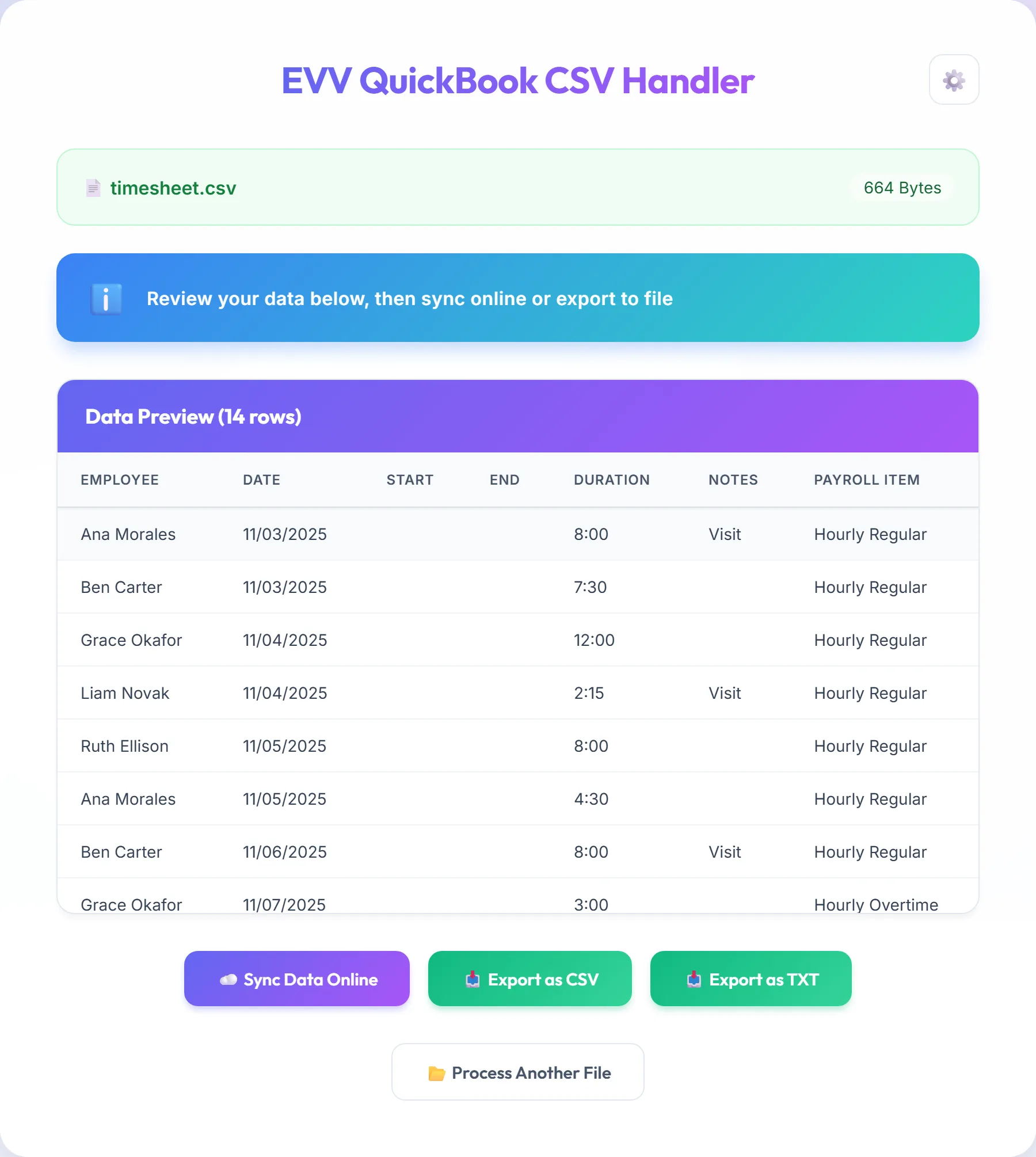
We chose a desktop app over a hosted system that connects EVV Plus to QuickBooks. The team already exported the CSV every week. So the app starts from that file and needs no login to EVV Plus. The app runs on the payroll team’s own computer and refuses any file that isn’t a CSV. The cost is one manual step: someone still exports the file and drops it in each week.
What was hard
Each of the three payroll formats takes the same hours written a different way. The app asks once which payroll software the team uses: QuickBooks Desktop, QuickBooks Online or ADP Workforce Now.

QuickBooks Online takes a duration as hours and minutes, so 7.5 hours becomes 7:30. ADP takes decimal hours to two places, 7.50. QuickBooks Desktop imports an IIF file, a tab-separated format with its own header rows. Those header rows name the QuickBooks version and release, which the app asks for at setup.
A payroll file that imports with a wrong hour pays someone wrongly. So the app keeps each format as its own mapping, apart from the others. The team also checks a preview of the converted rows before the app exports anything.
The result
The team stopped retyping timesheets. The converter saves the team 16 to 20 hours a week. That is the time the client’s team spent each week keying timesheets into QuickBooks by hand.
Built with
| Interface | React |
|---|---|
| Desktop app | Electron, for 64-bit, 32-bit and Arm Windows |
| CSV parsing | PapaParse |
| Installers | electron-builder |
| Payroll files | QuickBooks Desktop IIF, QuickBooks Online CSV, ADP CSV |
| Building | Claude Code |